
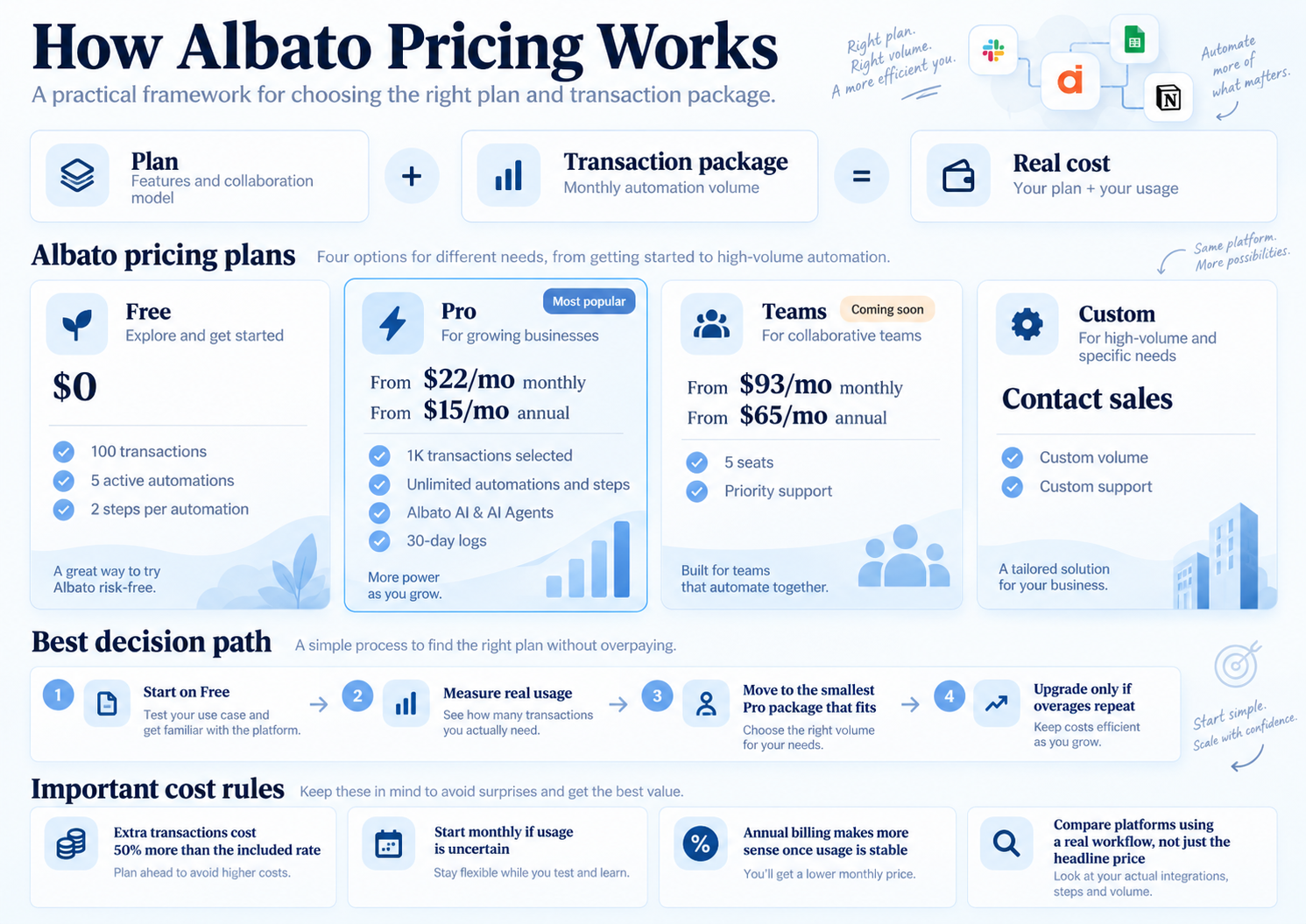
Current Plan and Cost Guide
Albato Pricing Explained: Plans, Transactions, Real Costs and Which Option Is Right for You
Albato’s 2026 pricing is easier to understand once you separate two things: the plan defines how you work, while the transaction package defines how much automation volume you use. That distinction matters more than the headline monthly price.
Pricing and terms checked September 8, 2026Quick Answer
Albato starts free, while Pro currently starts at $22/month monthly or $15/month with annual billing for 1K transactions
The important detail is that Albato no longer ties the plan and transaction allowance together as one fixed bundle. You choose a plan, then choose the monthly transaction package that matches your expected usage.
That makes Albato flexible, but it also means the real cost depends on transaction volume. If you run past your package, extra transactions can be purchased automatically at a 50% higher rate than the transactions included in your selected package.
Albato pricing is a two-part model
Albato’s February 2026 pricing change separated plan features from usage volume. This is the core idea to understand before comparing prices.
Albato Plans and Current Pricing
Albato currently lists Free, Pro, Teams and Custom. Teams is still marked as coming soon on the live pricing page.
Free
$0
- 100 transactions
- 5 active automations
- 2 steps per automation
- Unlimited apps and connections
- 7-day log storage
- 15-minute automation updates
Pro
$22/mo monthly
$15/mo annual billing, 1K selected
- Unlimited automations and steps
- Data migration and auto replay
- Albato AI and AI Agents
- Parallel scenario execution
- 30-day logs
- 5-minute automation updates
- 1,000+ apps
Teams
$93/mo monthly
$65/mo annual billing
- From 5K transactions
- Teams mode
- 5 team seats
- Priority support
- Shared workspaces and projects
Custom
Contact sales
- Designed for larger or specialized requirements
- Custom transaction volume
- Higher-touch support and management options
What counts as a transaction in Albato?
In practical terms, transactions are the units Albato uses to measure automation execution. The exact count depends on what your automation does, so estimate usage from real runs rather than from the number of automations alone.
A workflow is triggered
A new event starts the automation, such as a new Google Sheets row, form submission or webhook.
Albato runs the billable work
Filters, actions and other execution steps determine how much usage accumulates in real life.
Monthly transactions add up
The package is consumed over time, so a simple workflow can still become expensive if it runs often enough.
Northryn hands-on example
In Northryn’s Albato test, a Google Sheets workflow used a new-row trigger, a filter and a result-writing step. We also tested a negative case stopped by the filter plus a controlled missing-field error followed by recovery.
What changes the real cost
Two workflows can look equally simple but consume very different volumes if one runs far more often, uses more actions or keeps processing records throughout the month.
What happens if you exceed your transaction package?
Albato is designed to avoid suddenly stopping an automation when your package is exhausted.
Usage gets close to the limit
Albato warns you that your current package is running low.
Included transactions run out
If a valid payment method or balance exists, automation can keep running.
Extra transactions are added
Albato states these additional transactions cost 50% more than included package transactions.
You upgrade the package
Move to a larger package if overages become normal rather than exceptional.
Monthly vs Annual Billing
Albato currently advertises up to 30% savings with annual billing, but the better option depends on how certain you are about usage.
Which Albato plan fits your workflow?
Choose the plan and transaction package separately. The best setup is the smallest one that supports both your feature requirements and your real execution volume.
Use Free when you are still validating
Best for learning the builder, checking app compatibility and estimating transaction usage.
Use Pro when automations become operational
Best for individuals or small teams that need unlimited automations and steps plus scalable transaction volume.
Move beyond Pro only when collaboration or scale requires it
Teams is still marked as coming soon, while Custom makes sense when standard self-service pricing no longer fits.
How Albato pricing compares with Make and Zapier
Albato’s transaction model should not be reduced to a single “cheaper than” claim. Albato, Make and Zapier count usage differently and are best compared through one real workflow.
Albato
Plan capabilities and transaction volume are selected separately.
Make
Better suited to visually complex workflows and deeper execution visibility.
Zapier
Typically easier to start with, but it also follows its own usage and plan structure.
For the product-level decision, see Make vs Albato →
Is Albato good value?
Albato can be good value when your workflows are predictable, your transaction usage is measurable and you do not repeatedly spill into higher-cost extra transactions.
Albato is better value when you:
- Need straightforward no-code automation
- Can estimate transaction usage reasonably well
- Want unlimited automations and steps on Pro
- Prefer simpler trigger → condition → action workflows
- Can benefit from annual billing once usage stabilizes
Compare alternatives when you:
- Expect highly complex branching workflows
- Need deeper visual execution control
- Have volatile usage that repeatedly creates overages
- Need collaboration features that are not yet live
- Cannot estimate usage from real automation runs
Final Recommendation
Start with Free, measure real transaction usage, then move to the smallest Pro package that comfortably fits your workflow
Albato’s pricing is most attractive when you use the flexibility of the new model rather than treating the starting price as the full story.
If your usage is still uncertain, monthly billing gives you room to learn. Once the workflow is stable, annual billing can reduce the recurring cost. Avoid relying on automatic extra transactions as a permanent operating model because they cost 50% more than included transactions.
Frequently Asked Questions
How much does Albato cost?
Albato has a Free plan at $0 with 100 transactions. Pro currently starts at $22/month with monthly billing or $15/month equivalent with annual billing when 1K transactions are selected. Higher transaction packages increase the total cost.
Is Albato free?
Yes. Albato’s Free plan currently includes 100 transactions, 5 active automations, 2 steps per automation, unlimited apps and connections, 7-day logs and 15-minute update intervals.
What is an Albato transaction?
A transaction is Albato’s usage unit for automation execution. The number consumed depends on what the automation runs and how often it executes, so measure usage from real workflows rather than from the number of automations alone.
What happens if I exceed my transaction limit?
Albato can automatically purchase additional transactions so automations continue running when a valid payment method or balance is available. Albato states that those additional transactions cost 50% more than the transactions included in your selected package.
Is Albato cheaper with annual billing?
Yes. Albato currently advertises savings of up to 30% with annual billing. For the 1K Pro configuration, the page shows $22/month monthly or $15/month equivalent with annual billing.
Is Albato cheaper than Make?
There is no reliable universal answer because Albato and Make use different pricing and usage units. Compare the cost of the same real workflow at your expected monthly execution volume.
Does Albato have a Teams plan?
Albato currently lists Teams as coming soon. The live page shows $93/month monthly or $65/month equivalent with annual billing, starting from 5K transactions, but availability should be checked before making a purchasing decision.