
Hands-On Automation Review
Albato Review: Is It Worth It for Knowledge Workers and Small Teams?
Albato is a no-code automation platform built around triggers, actions, filters, data mapping and a growing AI layer. Northryn tested a real Google Sheets workflow to see where it feels strong, where the limitations appear, and how it compares with more established automation tools.
Hands-on review updated September 10, 2026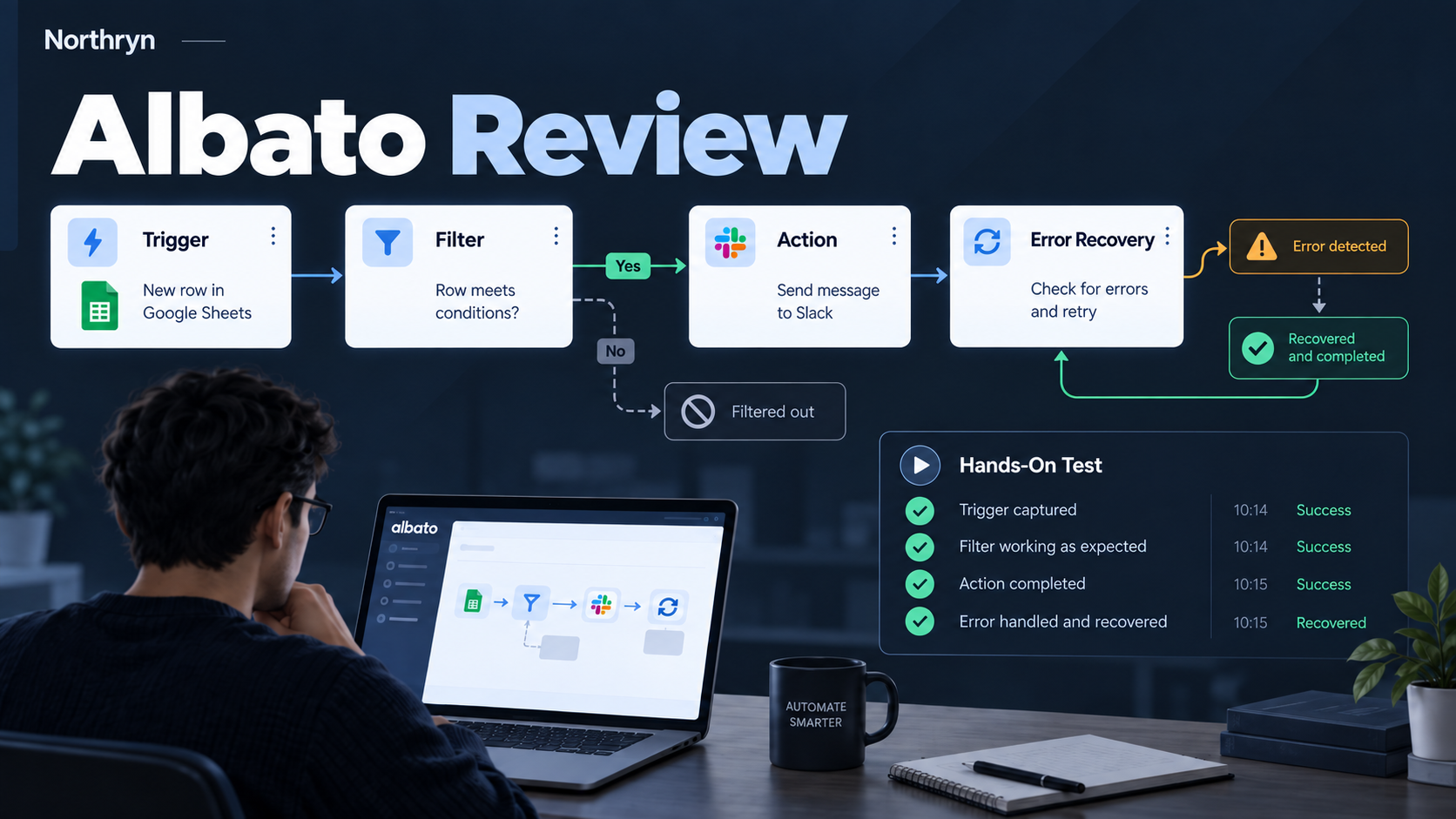
Quick Verdict
Albato is a credible, easier-to-follow automation option for straightforward workflows, but Make remains stronger when complexity is likely to grow
In Northryn’s test, Albato handled a simple trigger → filter → action workflow cleanly. The positive run completed as expected, a non-matching row was filtered out, and a deliberate missing-field error was visible and recoverable.
That makes Albato easy to recommend for users who want practical no-code automation without immediately moving into a more visually complex builder. Its limits become more important when workflows need heavy branching, advanced debugging or deeper execution visibility.
What is Albato?
Albato is an iPaaS automation platform for connecting apps and moving data between them without code. Its current self-serve product supports more than 1,000 apps, built-in automation tools, Albato AI, Copilot and AI Agents.
Core automation
Build trigger-and-action workflows, add filters and logic, map fields, use webhooks, migrate historical data and connect supported apps.
AI layer
Albato currently promotes Albato AI, a Copilot that can build workflows from natural-language instructions, and AI Agents that can act across connected tools.
How Northryn tested Albato
We used the same Google Sheets pattern previously used to test Make and Zapier so the workflow logic stayed comparable.
Trigger
A new row entered the source sheet.
Filter
The workflow checked whether Status matched the expected condition.
Action
A matching row was written into the Results output.
Error test
A required field was removed deliberately, then restored to verify recovery.
What happened in the test?
What worked well
- The positive workflow completed correctly.
- The filter blocked a row with the wrong Status value.
- The required-field error was visible rather than silently ignored.
- The workflow recovered after the missing configuration was corrected.
- The overall trigger → condition → action structure was easy to follow.
What the test did not prove
- High-volume reliability was not stress-tested.
- Complex multi-branch scenarios were not tested.
- Albato Copilot and AI Agents were not included in the hands-on workflow.
- Long-term operational support was not evaluated.
- The test does not prove Albato is cheaper than Make or Zapier for every workflow.
Workflow builder and ease of use
Albato’s strongest quality in this test was clarity. A simple automation reads naturally as a sequence of events rather than as a large visual system that must be understood all at once.
Good for getting operational quickly
For a straightforward integration, the builder makes it relatively easy to see what starts the workflow, what condition is applied and what should happen next.
Less compelling when complexity becomes the main problem
Albato’s simpler feel is an advantage until the workflow requires deeper branching, visual debugging or more granular execution analysis. That is where Make becomes more attractive.
Filters, errors and recovery
We tested more than the happy path to see whether Albato behaved predictably when a workflow should stop or fail.
Filter behavior was predictable
A row with the wrong Status value was blocked and did not reach the Results output.
The error was visible and recoverable
After removing a required field, Albato surfaced the problem and the workflow worked again once the configuration was restored.
Integrations and app coverage
Albato currently lists more than 1,000 apps, but raw app count matters less than whether your exact trigger and action are supported.
Albato lists integrations across productivity, CRM, marketing, ecommerce and communication tools.
The tested workflow connected a new-row trigger with filtering and an output action successfully.
A supported app may not expose every API capability. Check the exact action you need before paying.
Albato AI, Copilot and AI Agents
Albato’s product has expanded beyond conventional app-to-app automation. The current platform promotes AI-assisted workflow creation and agents that can use connected app actions as tools.
Albato Copilot
Albato says Copilot can ask clarifying questions, map fields, suggest logic, build workflows and help identify errors from natural-language instructions.
AI Agents
AI Agents can use models such as OpenAI, Google Gemini, DeepSeek or Albato’s built-in AI, then act through tools from connected apps.
Albato pricing and transaction model
Albato’s 2026 pricing separates feature access from automation volume, so the starting monthly price is only part of the real cost.
100 transactions for testing and light use.
Currently starts at $22/month for 1K transactions.
Currently $15/month equivalent for the same 1K configuration.
Albato vs Make
For the full evidence-led comparison, see Make vs Albato →
Who should use Albato?
Moving data between spreadsheets, forms, CRMs, email and other routine business tools.
Useful when ease of setup matters more than advanced scenario architecture.
Albato’s pricing works better when you understand the monthly volume of the workflows you run.
Make may provide more control if workflows involve heavy branching and debugging.
Albato still lists its Teams plan as coming soon, so verify live availability first.
The new AI layer is promising, but Northryn has not yet tested those features hands-on.
Albato strengths and limitations
Strengths
- Clear trigger → filter → action structure
- Successful positive and negative hands-on tests
- Visible error handling and recovery
- 1,000+ app integrations officially listed
- Flexible plan + transaction pricing model
- Growing AI automation layer
Limitations
- Less compelling than Make for complex visual scenarios
- Transaction usage needs active monitoring
- AI features were not tested by Northryn
- Teams plan is still marked as coming soon
- Integration depth varies by app and action
- High-volume reliability was outside the scope of this test
Final Verdict
Albato is worth considering if you want straightforward automation without starting with a more complex visual builder
Northryn’s test gives Albato a meaningful credibility advantage: the core workflow worked, the filter behaved correctly, and a deliberate error could be diagnosed and recovered from.
We would choose Albato for simpler operational automations where clarity and speed matter. We would still choose Make when the workflow is expected to grow into more complex branching, debugging and execution analysis.
Frequently Asked Questions
Is Albato good?
Albato performed well in Northryn’s simple Google Sheets automation test. The trigger, filter and output action behaved predictably, including a negative case and controlled error recovery. Its fit is strongest for straightforward no-code workflows.
Is Albato easier than Make?
For the workflow Northryn tested, Albato felt easier to follow. Make offers more visual control and is the stronger option when scenarios are likely to become more complex.
Does Albato have a free plan?
Yes. Albato currently offers a Free plan with 100 transactions, 5 active automations and 2 steps per automation.
How many apps does Albato support?
Albato currently lists more than 1,000 supported apps. Always verify that the exact trigger or action you need is available for your specific app.
Does Albato have AI features?
Yes. Albato currently promotes Albato AI, Copilot and AI Agents. Northryn did not include those capabilities in its hands-on test, so they are treated as official product information rather than tested findings.
Is Albato cheaper than Make or Zapier?
There is no reliable universal answer because each platform uses a different usage model. Compare the cost of the same real workflow at your expected monthly volume.