
Hands-on automation comparison
Make vs Albato: Which Automation Platform Should You Choose?
Make and Albato both completed the same practical Google Sheets workflow in our testing. The more useful difference is not whether they can automate it, but how much control, complexity and usage economics you want around the workflow.
Quick verdict
Make is better for growing workflow complexity; Albato is easier to justify for straightforward automations.
Both platforms passed our comparable test. Make gives more visual control over modules, routing and workflow structure, while Albato felt more compact for the direct trigger → condition → action automation we tested.
Choose Make if you value
- A highly visual automation canvas
- More room for branching and workflow growth
- Granular visibility into data movement
- A platform suited to increasingly complex scenarios
Choose Albato if you value
- A compact, sequential setup experience
- Direct trigger-to-action workflows
- Clear field mapping and execution history
- Lower visual overhead for simple automations
Make vs Albato at a glance
| Area | Make | Albato |
|---|---|---|
| Northryn test result | Passed | Passed |
| Builder style | Highly visual and granular | Compact and sequential |
| Best fit | Multi-step or growing workflows | Direct, straightforward automations |
| Usage model | Credits | Transactions |
| Free plan | Up to 1,000 credits/month | 100 transactions |
| Paid example checked | Core: $12/month for 10k credits with monthly billing | Pro: $22/month monthly or $15/month annually for 1k transactions |
What Northryn actually tested
We used the same underlying Google Sheets workflow logic in both platforms so the comparison would reflect practical execution rather than feature-page claims.
Make
Make watched for a new row, allowed only rows where Status = Ready, mapped the relevant fields and added the resulting row to a separate Results sheet.
Albato
Albato watched the same type of source row, applied an incoming Status = Ready filter and wrote Source, Title, Category and Status to the Results sheet.
Positive case
A row marked Ready passed through the workflow and appeared correctly in the Results sheet.
Blocked case
A row marked Draft did not appear in Results, confirming that the filter blocked the output action.
Error and recovery
Removing Albato’s required Source mapping produced an immediate validation warning. Restoring the field and saving cleared the error.
This test validates the direct workflow behaviour described above. It does not establish a universal winner for large arrays, advanced code, high-volume workloads or long-running production reliability.
Builder experience
The biggest practical difference was not whether the workflow worked, but how each platform presented and controlled it.
Make
Albato
Make’s extra visual structure becomes useful as workflows grow. Albato’s more compact flow can be easier to work with when the automation remains direct.
Execution history and troubleshooting
Albato’s History view was useful during the practical test because it showed both the trigger receiving the incoming Google Sheets row and the following output step completing successfully.
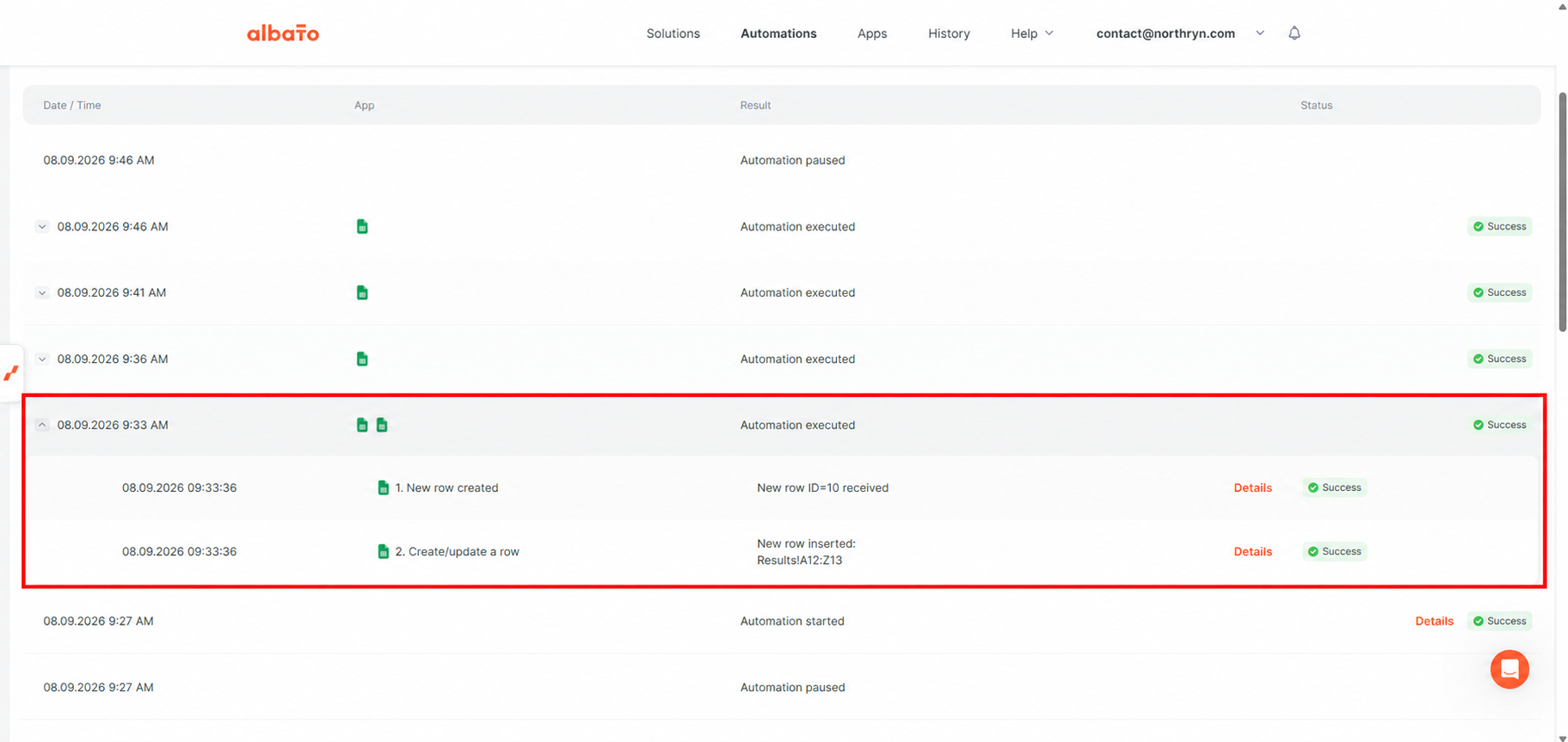
This view also makes Albato’s billing model easier to understand. The trigger begins the automation, but transactions are counted on successfully executed steps after that trigger.
During our test, the account counter showed one transaction used after the successful trigger-plus-one-action flow, which was consistent with Albato’s current transaction model.
The successful execution and its two visible steps were observed directly in Northryn’s test. Albato’s rule that the trigger itself does not consume a transaction comes from Albato’s current official documentation.
Pricing and usage economics
Make and Albato both meter automation usage, but their units are different. That means headline allowances cannot be compared as though one Make credit equals one Albato transaction.
Make Free
$0 with up to 1,000 credits per month. Make states that module actions such as adding a Google Sheets row generally consume credits according to the scenario’s execution.
Make paid example
At 10,000 credits with monthly billing selected, Make currently shows Core at $12/month, Pro at $21/month and Teams at $38/month.
Northryn Make test
The successful comparable workflow recorded three Make credits. That number describes this specific scenario only and should not be treated as a universal cost per automation.
Albato Free
$0 with 100 transactions. The Free plan also currently includes five active automations, two steps per automation and a 15-minute polling interval.
Albato Pro example
Albato currently shows Pro with 1,000 transactions at $22/month with monthly billing or $15/month with annual billing selected.
How Albato counts usage
Albato states that the trigger itself does not consume a transaction. Successfully executed steps after the trigger do.
The platforms define their usage units differently. The useful comparison is the cost of your actual workflow over realistic monthly volume.
Which tool is better for different users?
Best for workflows likely to grow
Make
Its visual canvas and granular scenario structure are better suited to workflows that may later add more modules, routes or logic.
Best for straightforward automations
Albato
Its compact builder made the direct trigger → condition → action workflow easier to scan without adding much interface overhead.
Best for visual workflow control
Make
Make exposes the structure and relationship between modules more explicitly.
Best for this simple test
Tie on execution
Both platforms completed the intended Ready workflow and respected the configured condition.
If high task volume and free internal operations matter more than visual workflow depth, Pabbly Connect is also worth evaluating. See Northryn’s hands-on Pabbly Connect Review for workflow testing, task-consumption evidence and pricing context.
Final comparison
The test did not reveal a basic reliability problem with either platform. The more meaningful difference is the amount of structure and complexity each one places around the automation.
Make is the safer default when the workflow may become larger, more branched or more operationally important over time.
Albato is a credible alternative when the workflow is structurally simple and its supported apps already cover what you need.
Both passed the practical test. Our recommendation is based on workflow fit rather than treating one platform as universally superior.
Choose Make when you expect complexity to increase. Choose Albato when you want a simpler, more compact route through straightforward automations. For this specific workflow, both platforms delivered the intended result.
Frequently asked questions
Is Albato better than Make?
Not universally. Both completed our comparable Google Sheets automation. Albato is easier to justify for direct workflows, while Make is our preference when complexity is likely to grow.
Is Make easier to use than Albato?
Make is more visual and granular. Albato felt more compact and sequential in our test, which can reduce the initial cognitive load of a simple automation.
Is Albato cheaper than Make?
It depends on the workflow. Make uses credits and Albato uses transactions, and those billing units are not directly equivalent.
Does an Albato trigger use a transaction?
Albato currently states that the trigger itself does not consume a transaction. Successfully executed steps after the trigger do.
Choose based on the workflow you expect to maintain
Make is the stronger default for growing automation complexity. Albato is a credible simpler alternative when your workflows remain direct and its app coverage fits your stack.
Sources and methodology
Northryn built comparable Google Sheets automations in Make and Albato and evaluated successful execution, filtering, mapping, execution history and a controlled configuration error. Pricing and usage-model information was checked against official product sources in September 2026.
Tested behaviour is described as tested. Pricing and transaction rules are attributed to official product information. Broader product-fit conclusions are Northryn editorial judgments.