
Make pricing guide
Make Pricing Explained: Plans, Credits, and Which Tier Is Right for You?
Make looks inexpensive at first glance, but the right plan depends on more than the headline price. This guide explains how credits work, what each plan changes, and how to estimate your real usage before paying.

Quick answer
Start with Free for testing. Core is the sensible default once an automation matters.
The Free plan is enough to learn Make, build a small proof of concept and run light automations. Core is usually the best starting paid plan for an individual or small business because it removes the two-scenario limit, enables one-minute scheduling and increases the practical operating limits.
Choose Free
You are learning, testing one or two scenarios, or running a low-volume workflow that can wait 15 minutes between scheduled checks.
Choose Core
You need dependable business automations, unlimited active scenarios, faster scheduling, larger files or API access.
Choose Pro
You specifically need priority execution, custom variables, full-text log search or more room for files and advanced operations.
Choose Teams or Enterprise
You need collaboration roles, shared templates, governance, stronger security controls or enterprise support—not simply more credits.
Make pricing plans at a glance
Make offers five plan levels. The starting prices below were displayed for 10,000 monthly credits with annual billing selected when this guide was checked. The Free plan includes 1,000 credits; paid plans can be configured with different credit volumes.
| Plan | Starting price shown | Best for | Important difference |
|---|---|---|---|
| Free | $0 | Learning and light testing | 1,000 credits, two active scenarios and 15-minute minimum scheduling |
| Core | $9/month | Individuals and small businesses | Unlimited active scenarios, one-minute scheduling, higher limits and API access |
| Pro | $16/month | Advanced or business-critical workflows | Priority execution, custom variables and full-text execution-log search |
| Teams | $29/month | Collaborative automation teams | Team roles and shared scenario templates |
| Enterprise | Custom | Large or regulated organizations | Advanced security, enterprise integrations, overage protection and 24/7 support |
Important: the plan level and credit volume are separate decisions. Exceeding 10,000 credits does not automatically mean that you need Pro. Make offers higher credit tiers on eligible paid plans; upgrade the plan when you need its features, not merely because the base credit bundle is too small.
How Make credits work
Credits are Make’s billing unit. For most standard apps, one module operation uses one credit. If a scenario reads a record, transforms it and writes a new row, each chargeable module operation contributes to the total.
Some important exceptions make simple multiplication less reliable:
- Routers, filters and error-handler modules do not use credits.
- Aggregators and iterators can change consumption because they combine or split bundles.
- Make Code is charged according to execution time rather than a simple one-credit module rule.
- Built-in AI features may add usage-based credits for tokens, files, pages or other processing.
- Retries and repeated processing can increase usage even when the business outcome looks like one task.
A credit is not the same as a completed business task
One completed task may require several module operations. Estimate the whole scenario, including the number of bundles passing through each chargeable module, rather than counting only the final result.
How to estimate the credits you need
Use this as a planning estimate
Monthly credits ≈ processed items × chargeable module operations per item + variable AI usage + retries
Run the real scenario a few times and check Make’s credit-usage view before purchasing a large allowance. The formula is useful for planning, but execution history is the better source once a workflow exists.
Northryn’s practical example
In Northryn’s Google Sheets test, Make watched for a new row, allowed only rows where Status = Ready, mapped the fields and added one output row. A successful processed row recorded three chargeable operations. The filter itself did not add a credit.
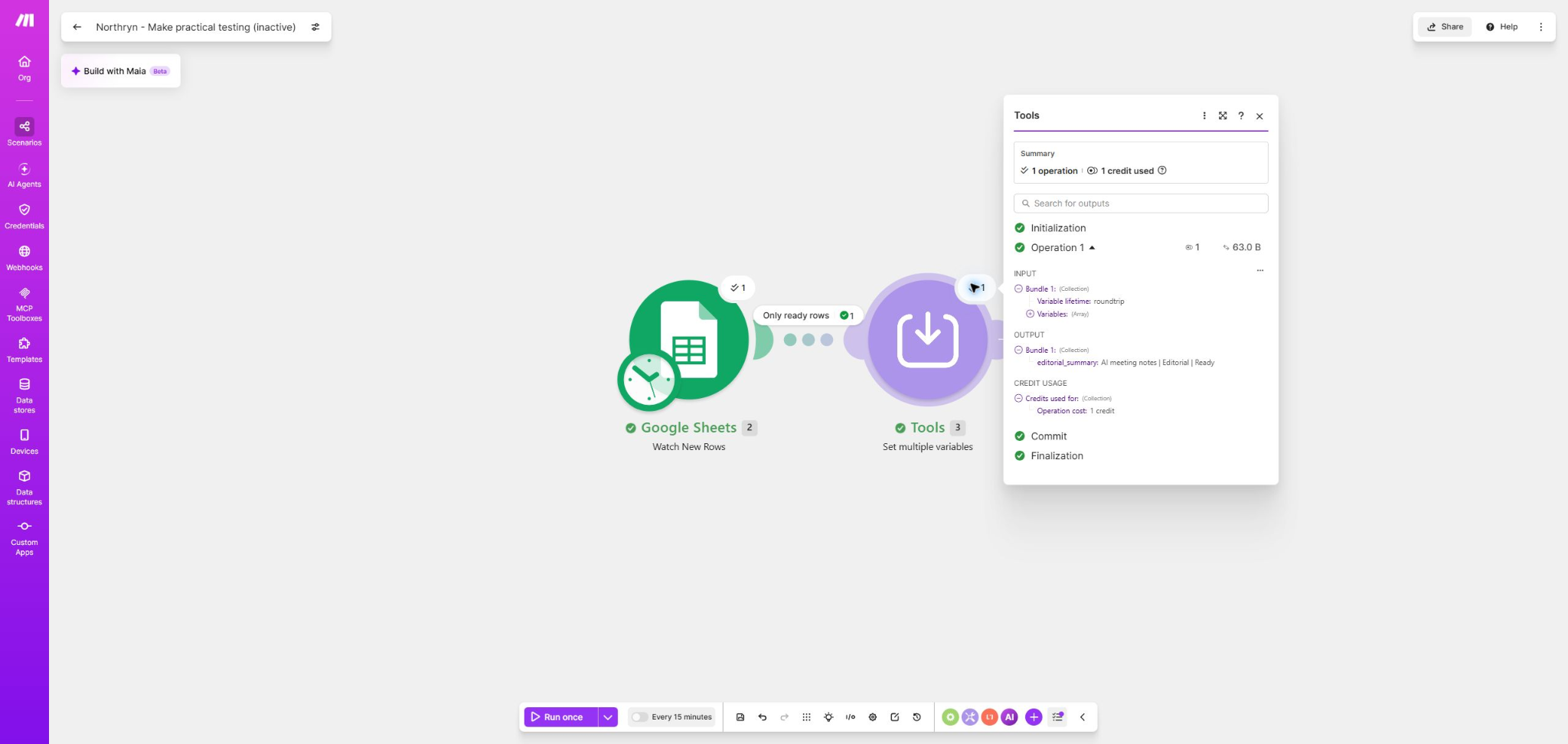
Light personal use
1 successful item/day × 3 credits × 30 days = about 90 credits/month.
Regular small workflow
10 successful items/day × 3 credits × 30 days = about 900 credits/month.
Higher-volume workflow
100 successful items/day × 3 credits × 30 days = about 9,000 credits/month.
These numbers describe this one tested scenario, not every Make workflow. Add modules, loop through multiple bundles or use dynamic AI processing and the same number of incoming items can consume substantially more.
Which Make plan is right for you?
Learn and validate
Make Free
$0 · 1,000 credits/month
Free is a genuine starting plan rather than a short trial. It is the right choice when you still need to prove that the workflow works and saves enough time to justify maintaining it.
- Up to two active scenarios
- 15-minute minimum scheduled interval
- Five-minute maximum scenario execution time
- Up to 5 MB file size
- Seven days of execution-log storage
Main limitation: the small active-scenario allowance and 15-minute scheduling floor become restrictive before 1,000 credits necessarily do.
Best default paid plan
Make Core
From $9/month · 10,000 credits
Core is the strongest default for solo operators, creators and small businesses moving from experiments to useful recurring automations.
- Unlimited active scenarios
- Scheduling down to one minute
- Up to 40-minute scenario execution
- Up to 100 MB file size
- 30 days of execution-log storage
- Access to the Make API
Choose Core when: the automation has proved useful and the Free plan’s operating limits—not just its credit allowance—are becoming a bottleneck.
Advanced operation
Make Pro
From $16/month · 10,000 credits
Pro is not automatically better value for every paid user. Its value comes from operational features that matter when workflows become harder to monitor or more important to the business.
- Priority scenario execution
- Custom variables
- Full-text execution-log search
- Up to 250 MB file size
- Higher API rate limits than Core
Choose Pro when: one of those capabilities solves a real constraint. Do not upgrade only because the word “Pro” feels safer.
Collaboration
Make Teams
From $29/month · 10,000 credits
Teams adds coordination features for multiple people building or managing automation. It is less about an individual workflow becoming complex and more about shared ownership.
- Team roles and permissions
- Create and share scenario templates
- Up to 500 MB file size
- Higher API rate limits
- Higher-priority guidance
Choose Teams when: several people need structured access and reusable shared workflows. A one-person business rarely needs it at the beginning.
Governance and scale
Make Enterprise
Custom pricing
Enterprise is designed for organizations whose requirements involve security, governance, support and infrastructure—not only automation volume.
- Advanced security capabilities
- Enterprise app integrations
- Custom functions support
- Overage protection
- 24/7 enterprise support
Choose Enterprise when: procurement, security or governance requirements cannot be met by a standard self-service plan.
Northryn recommendation
Do not buy capacity before validation
Build the smallest reliable version on Free, run representative data through it and inspect actual usage. Upgrade to Core when the workflow proves useful or Free’s practical limits interfere with the outcome.
This follows a simple rule: understand and improve the process before automating it, then pay only for the capacity the improved process needs.
A simple decision process
Build one representative scenario. Use real-looking data and include the branches, transformations or AI modules you genuinely expect to use.
Run positive, blocked and error cases. A happy-path test alone does not show how retries, errors or multiple bundles affect consumption and maintenance.
Check credits per successful outcome. Use scenario history or the module-level credit view rather than estimating from the number of boxes on the canvas.
Project a realistic monthly range. Calculate normal use and a higher-volume month. Include retries and variable AI usage where relevant.
Select credit volume, then plan features. Choose Core, Pro or Teams based on the operational capability you need—not on status or vague expectations of future scale.
Cost risks people miss
Bundles multiply work
One trigger can return several bundles. Downstream modules may then run once for every bundle, increasing credits faster than the number of scenario executions suggests.
AI can be variable
Some built-in AI features use credits based on tokens, pages, files or other processing. A static “one module equals one credit” estimate may understate the real usage.
Extra credits cost more
Make states that manually or automatically purchased extra credits carry a 25% additional cost compared with credits included in the plan.
Unused credits expire
Credits do not create permanent stored value. Their expiry depends on the subscription and billing term, so oversized allowances can become wasted spend.
Running out can stop scenarios
Without added credits, an exhausted allowance can pause continued processing. Business-critical workflows need monitoring and an intentional capacity policy.
Complexity has a human cost
A workflow can be cheap in credits and expensive to debug. Maintenance time, failure risk and process clarity belong in the buying decision too.
Worst reasonable scenario
You automate a poorly understood process, the scenario multiplies bundles or retries, usage grows unexpectedly and an important workflow stops—or repeatedly buys higher-cost extra credits. Reduce this risk by validating the process first, setting usage alerts, inspecting high-consumption scenarios and reviewing actual credits per business outcome.
Monthly or annual billing?
Annual billing can reduce the headline price, but the discount is useful only when Make has already earned a stable place in your workflow. Monthly billing preserves flexibility while you validate demand, reliability and real credit consumption.
Use monthly billing first when the workflow is new, volumes are uncertain or you are still comparing Make with another platform. Consider annual billing when several months of evidence show that the automation is valuable, maintainable and likely to remain in use.
Where Make’s pricing is strong—and where it is not
Make’s entry pricing is accessible for people who need visual multi-step automation, and Core removes several important Free-plan limits without a large starting commitment. The ability to choose different credit volumes also means plan features and usage capacity do not have to move in lockstep.
The trade-off is that credit consumption requires more thought than a simple price-per-workflow headline. Complex branching, many bundles and built-in AI can make forecasting less intuitive. If you prefer the broadest app catalog and a more linear setup experience, read Northryn’s Make vs Zapier comparison. If you value explicit execution-based pricing or self-hosting control, see Make vs n8n.
For a broader view of the category, Northryn’s automation tools guide explains where Make fits alongside other workflow and AI tools.
Frequently asked questions
Is Make free?
Yes. Make’s Free plan has no stated time limit and includes 1,000 credits per month, up to two active scenarios and a 15-minute minimum interval for scheduled scenarios. It is suitable for learning and light validation.
How much does Make cost?
When checked on 19 August 2026, Make showed starting annual-billing prices of $9/month for Core, $16/month for Pro and $29/month for Teams at 10,000 credits per month. Enterprise pricing is custom. Your price can vary by billing frequency, currency, tax and selected credit volume.
What is a credit in Make?
A credit is Make’s usage and billing unit. Most standard app operations consume one credit, while some features—especially built-in AI and code execution—can use a different or variable amount.
Do filters and routers use Make credits?
Make’s official documentation states that router modules and filters do not use credits. Error-handler modules are also listed as having no credit cost.
What happens when Make credits run out?
Make states that scenarios will not continue running until credits are added. Paid users can upgrade, buy extra credits or enable automatic extra-credit purchasing, subject to the current terms and additional cost.
Is Make Core or Pro better?
Core is the better default for most individual and small-business users. Pro is worth paying for when priority execution, custom variables, full-text log search, larger file limits or higher API limits solve a real operational need.
How many Make credits do I need?
Estimate processed items multiplied by chargeable module operations per item, then add variable AI usage and retries. Run a representative scenario and inspect actual credit usage before choosing a large allowance.
Is annual Make billing worth it?
It can be once the workflow is stable and likely to remain useful. Monthly billing is safer during validation because it preserves flexibility while you learn your real usage and maintenance requirements.
Sources and methodology
Hands-on evidence: Northryn used the previously tested Make Google Sheets scenario documented for its Make review and automation comparisons. The workflow covered a successful Ready row, a blocked Draft row, a controlled missing-range error and recovery. The three-credit calculation in this guide comes from the successful test run and is presented only as an illustrative workflow.
Official sources checked 19 August 2026:
Final recommendation
Validate on Free. Move to Core when the workflow—not ambition—justifies it.
Build one representative automation, inspect its real credit usage and upgrade only when Free’s limits interfere with a workflow that already saves meaningful time or improves reliability. Pro and Teams should solve specific operational constraints, not act as default upgrades.