
Hands-on comparison
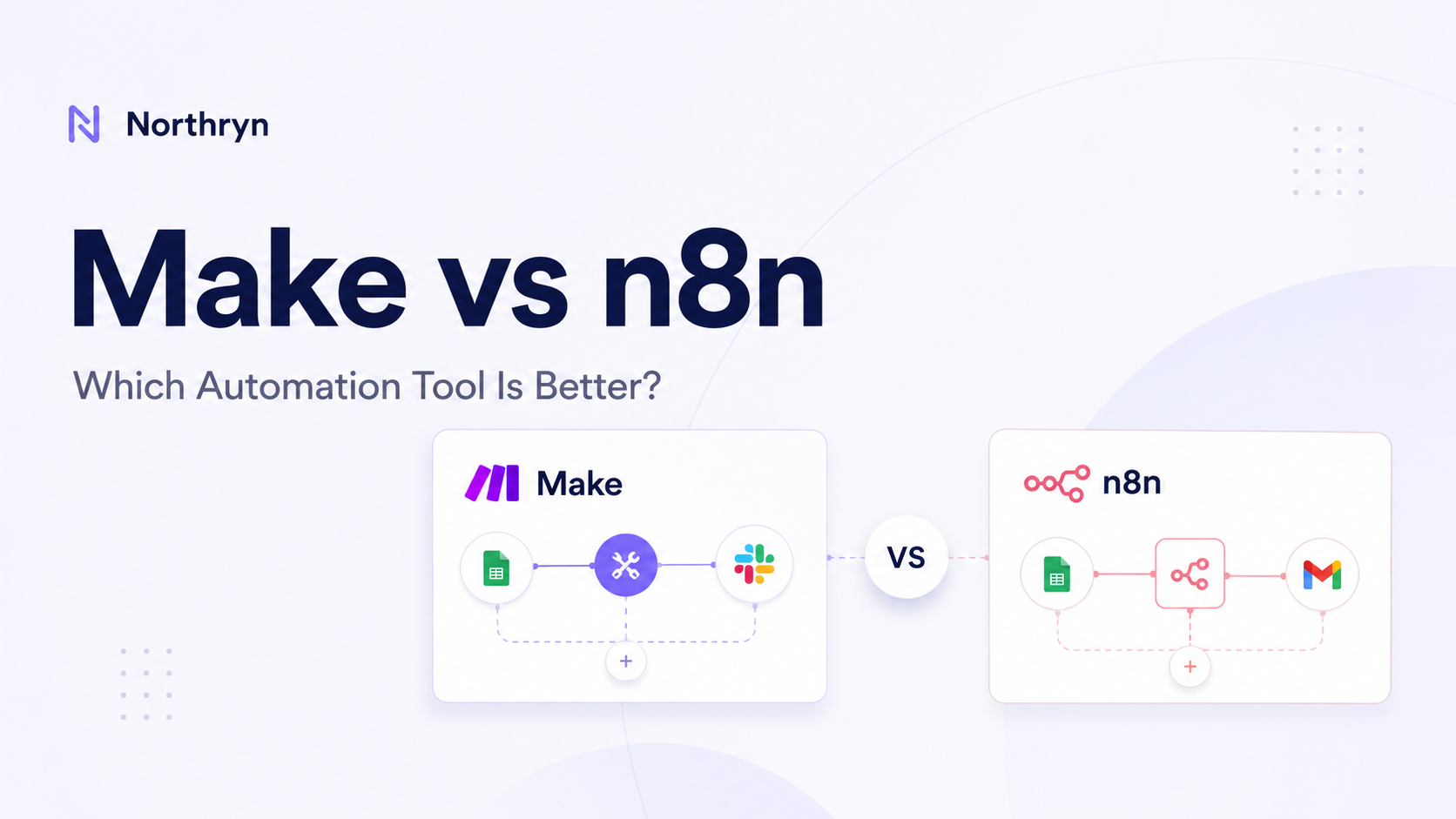
Make vs n8n: Which Automation Tool Is Better for Workflows?
Make and n8n can both automate multi-step workflows across apps, data and AI tools. Northryn built the same Google Sheets workflow in both platforms to compare setup, mapping, branching, debugging, usage models and control.
Quick verdict
Make is easier to approach. n8n gives you more explicit control.
Both completed the same core workflow successfully. The meaningful difference was not whether the automation worked, but how each platform exposed the data, condition logic, errors and recovery process.
Choose Make if you value
- A more guided visual builder
- Lower initial cognitive friction
- A polished no-code workflow experience
- Broad ready-made app coverage
Choose n8n if you value
- Explicit data handling and expressions
- Clear true/false branching
- Node-level execution visibility
- Self-hosting or deeper technical control
Bottom line: Make is the stronger default for approachable visual automation. n8n is the stronger fit when control, debugging and technical flexibility matter more.

Winner by category
There is no useful universal winner. These are the clearest differences supported by Northryn’s test and current product structure.
More guided and easier to understand at the beginning.
True/false branches and item flow were more explicit.
Node-level execution state was especially clear in our test.
Currently advertises more than 3,000 pre-built apps.
Offers Cloud plus self-hosted options.
Approachability versus explicit technical control.
Make vs n8n at a glance
The key trade-off is easier visual workflow building versus deeper visibility and technical ownership.
| Area | Make | n8n | Best fit |
|---|---|---|---|
| Best for | Visual no-code automation and guided workflow building. | Technical builders, explicit data handling and self-hosting. | Profile-based |
| Ease of setup | More guided and approachable in Northryn’s test. | Understandable, but exposes more technical detail. | Make |
| Condition logic | Visual filter between modules. | Explicit If node with true/false branches. | n8n |
| Transformation | Visual, low-code mapping. | Expressions and fields are more inspectable. | Different styles |
| Debugging | Useful run history, module activity and credit visibility. | Strong node-level state and execution inspection. | n8n in our test |
| Usage model | Credits. | Cloud paid plans are based primarily on workflow executions. | Workflow-dependent |
| Hosting | Managed cloud platform in this comparison. | Cloud plus self-hosted options. | n8n |
| Learning curve | Lower initial friction. | More technical mental model. | Make first |
What Northryn actually tested
We built the same small Google Sheets workflow in both platforms rather than comparing feature lists alone.
Read Title, Category and Status from Google Sheets.
Allow only rows where Status = Ready.
Map the fields into a clean workflow output.
Write one row to the Results sheet.
Both platforms allowed a Ready row through the workflow and wrote the expected output.
Both prevented Draft rows from reaching the final output.
Both surfaced a deliberate missing-sheet error and recovered after the valid reference was restored.
| Test | Make evidence | n8n evidence |
|---|---|---|
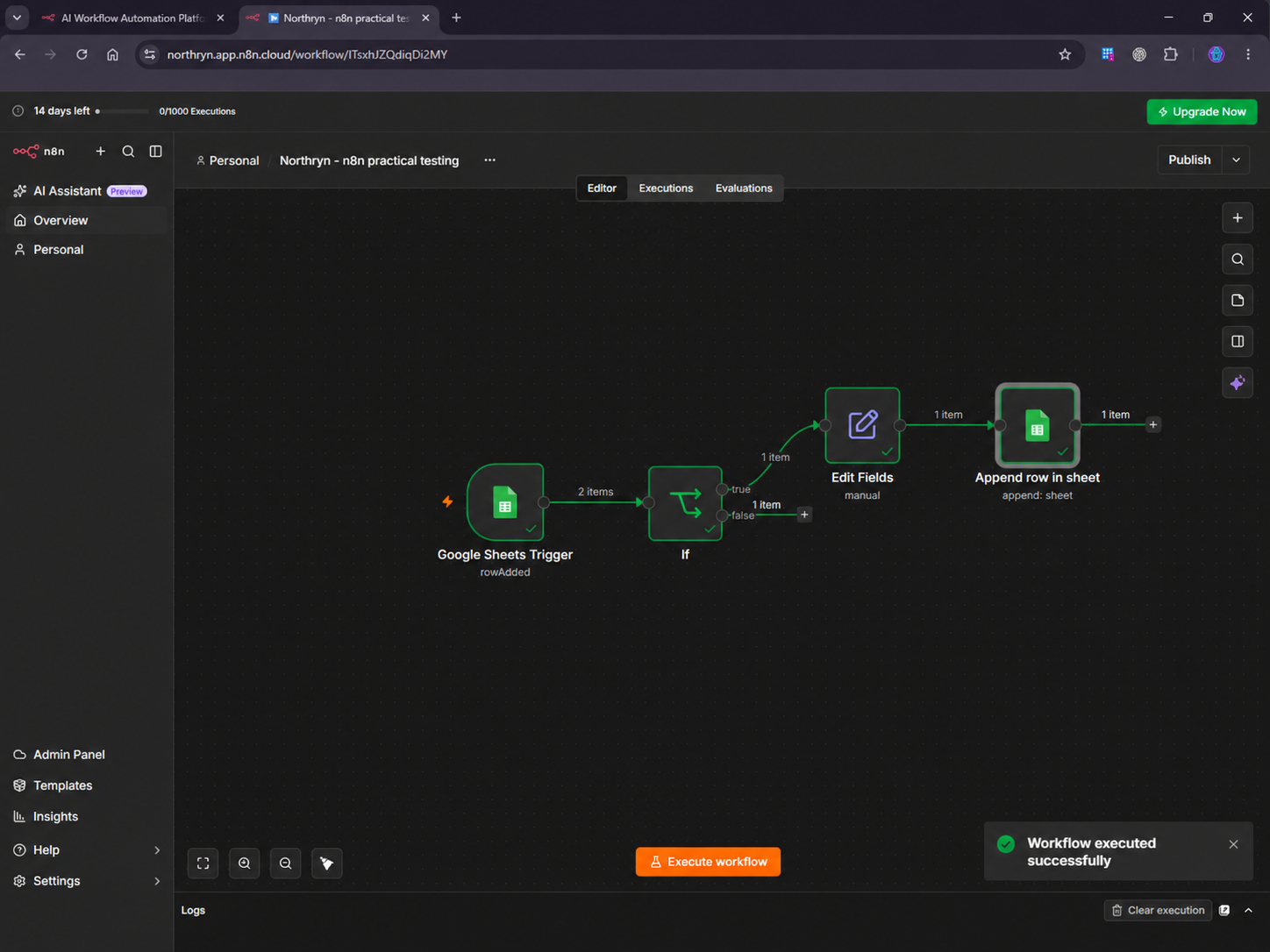
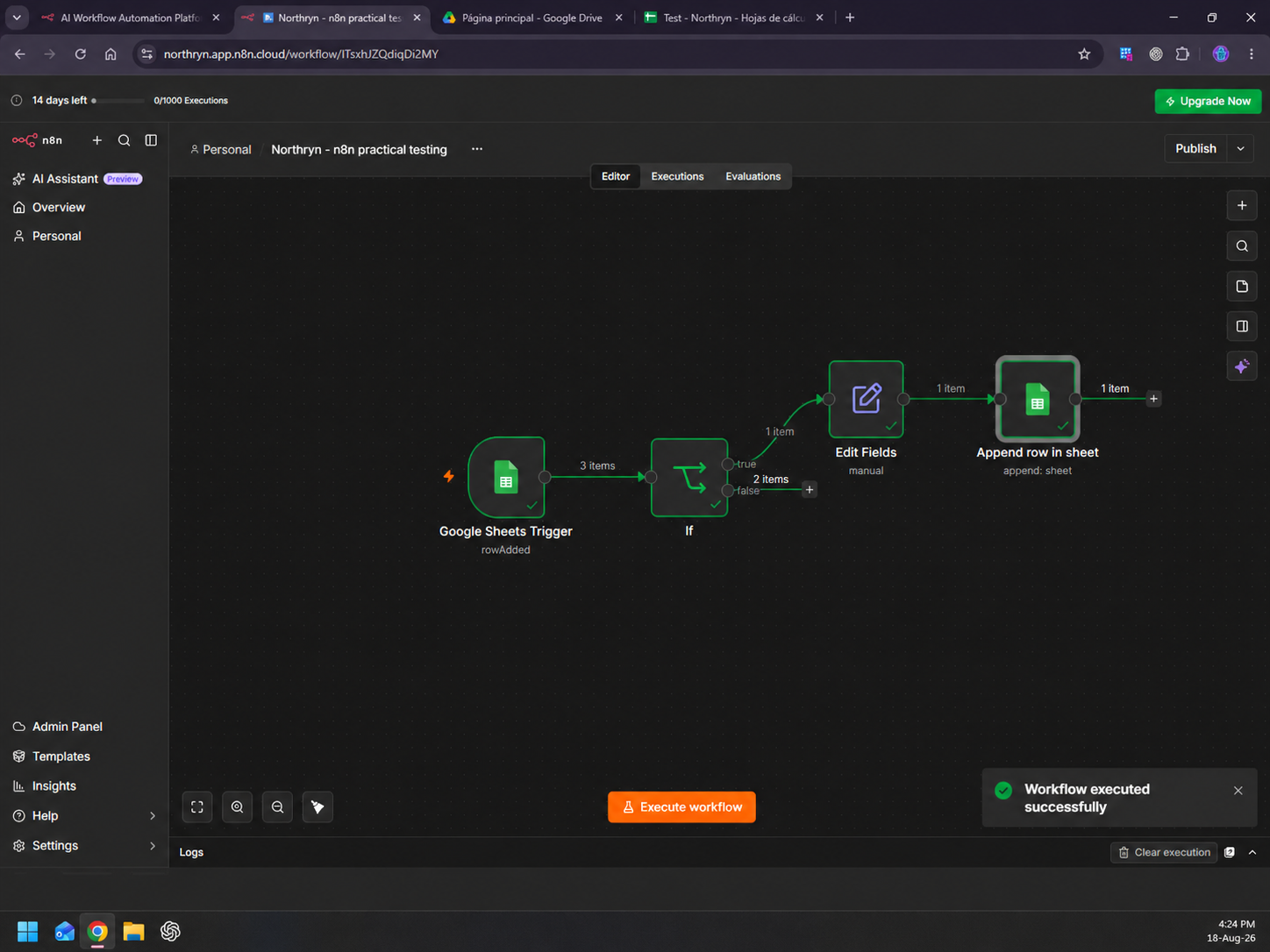
| Workflow structure | Watch New Rows → filter → Set multiple variables → Add a Row. | Google Sheets Trigger → If → Edit Fields → Append row. |
| Positive run | Ready row completed. Final run: 3 operations, 3 credits, 528 B transfer. | Ready row followed the true branch and wrote the expected Results row. |
| Negative run | Draft row was blocked by the filter. | Draft items followed the false branch and did not reach output. |
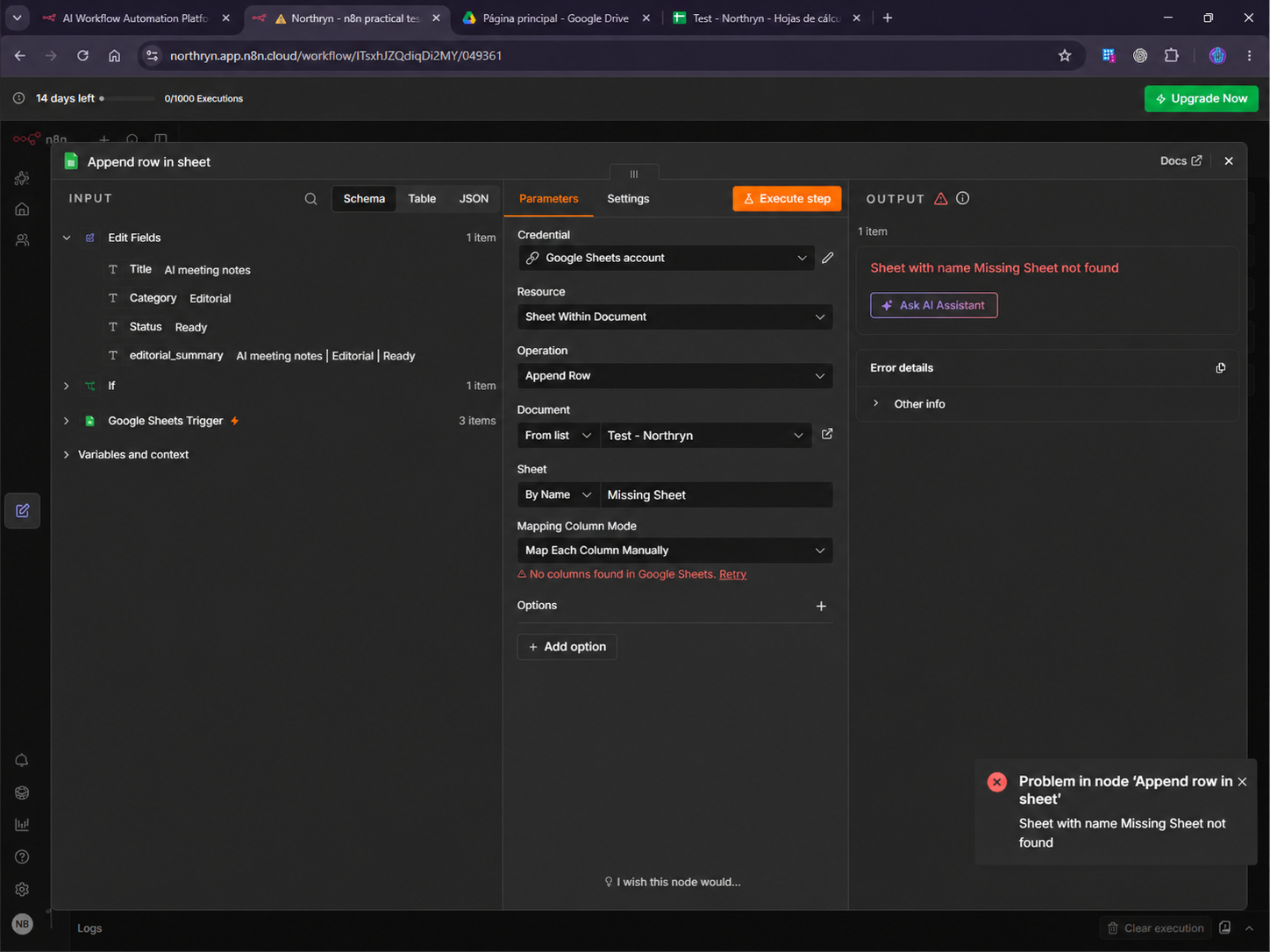
| Controlled error | Invalid sheet range returned 400 INVALID_ARGUMENT. | Missing output sheet returned “Sheet with name Missing Sheet not found”. |
| Recovery | A later run succeeded after restoring the valid sheet reference. | Restoring Results allowed successful execution again. |
Workflow-building experience
Both are visual builders, but they ask the user to think about automation differently.
More guided
Make
Make felt visual-first and easier to scan. Modules, connections and filters made the workflow sequence easy to understand at a glance.
What worked well
- Clear scenario canvas
- Easy-to-understand visual filters
- Approachable field mapping
- Useful execution and credit visibility
More explicit
n8n
n8n exposed more of the underlying data and workflow state. Its If node, expressions and node-level execution data made the logic highly visible.
What worked well
- Explicit true/false branching
- Transparent expressions
- Easy field inspection
- Strong execution-state visibility
Data mapping and branching
Both handled the same task successfully. The difference was how visible the transformation and decision logic felt.
Make: easier visual mapping
Make used a Tools module to create an editorial_summary variable while the final Google Sheets output mapped the original trigger fields directly. This was easy to follow visually.
n8n: more explicit field logic
n8n used Edit Fields to create the same editorial_summary expression while preserving the source fields. Expressions and field-level data were easier to inspect directly.
Make: simple filtering
A filter between modules blocked the Draft row before the remaining workflow continued.
n8n: explicit branching
The If node exposed true and false branches directly and showed which items followed each path.
Error clarity, recovery and execution history
This was one of the clearest practical differences in our hands-on test.
Make error
An invalid Google Sheets range returned 400 INVALID_ARGUMENT and identified the failing trigger. A later successful run confirmed recovery.
n8n error
A deliberately missing output sheet returned “Sheet with name Missing Sheet not found” directly on the Append row node.
| Debugging area | Make | n8n |
|---|---|---|
| Error specificity | Specific Google Sheets range error with failing module. | Direct missing-sheet message tied to the output node. |
| Recovery | Successful later run confirmed recovery. | Successful retry after restoring Results confirmed recovery. |
| Execution history | Historical runs, operations, credits and transfer data. | Success/error runs, durations and node-level state. |
| Our test | Good scenario-level visibility. | Stronger node-level debugging feel. |
Pricing and usage model
Make credits and n8n executions are different billing units. Comparing the headline numbers directly is misleading.
Make
Credit-based usage- Free plan: up to 1,000 credits/month
- Most standard module actions use one credit
- Some AI or usage-based features can consume credits differently
- More steps and more frequent runs can increase usage
n8n Cloud
Execution-based plans- Paid plans are based primarily on workflow executions
- Current Starter includes 2,500 executions/month
- Current Pro includes 10,000 executions/month
- Plans include unlimited workflow steps
For a deeper breakdown of Make’s credit model and plan tiers, see Northryn’s Make pricing guide.
Cloud, self-hosting and technical ownership
This is a structural difference, not merely a user-interface preference.
Choose managed simplicity
Make is the easier fit if you want the platform managed for you and prefer to focus on building cloud automations rather than infrastructure.
Choose technical ownership
n8n is the stronger fit if self-hosting, infrastructure control or a more developer-oriented environment matters to you.
Integrations and app coverage
Make currently advertises more than 3,000 apps. n8n’s public integration directory currently lists more than 2,000 integrations.
Which should you choose?
Match the platform to how you want to build and maintain workflows.
Choose Make if…
- You want a more approachable visual builder.
- You prefer lower initial technical friction.
- You mainly need managed cloud automation.
- You value broad ready-made app coverage.
- You prefer guided workflow building.
Choose n8n if…
- You want explicit data handling and expressions.
- You value visible true/false branching.
- Node-level debugging matters to you.
- You may want self-hosting.
- Your workflows may grow into APIs, code or more complex logic.
Common mistakes when comparing Make and n8n
Model the cost of your actual workflow instead.
More control can also mean more technical ownership.
Check the exact trigger, action and fields you need.
Start with one small workflow before scaling complexity.
AI workflows still need review where errors would matter.
Test blocked conditions, bad fields and broken references.
Related Northryn guides
Frequently Asked Questions
Is Make better than n8n?
Make is generally the better fit for users who want a more guided visual builder and lower initial technical friction. n8n is stronger for users who want explicit data handling, debugging visibility and greater technical control.
Is n8n better than Make?
It can be if you are comfortable with a more technical workflow model and value expressions, explicit branching, execution visibility or self-hosting.
Which is easier to learn, Make or n8n?
Make was easier to approach in Northryn’s practical test. n8n remained understandable, but exposed more technical details such as expressions, node data and explicit branches.
Can both Make and n8n automate Google Sheets?
Yes. Northryn tested the same Google Sheets workflow in both platforms. Both read input data, applied a Status = Ready condition and wrote an output row.
Which is better for debugging?
n8n provided stronger node-level execution visibility in Northryn’s test. Make also provided useful execution history, module activity and credit data.
Is n8n cheaper than Make?
Not necessarily. n8n Cloud uses execution-based pricing while Make uses credits. Real cost depends on workflow frequency, complexity, AI usage, hosting and maintenance.
Does n8n offer self-hosting?
Yes. n8n offers self-hosted options including Community Edition. Northryn tested n8n Cloud rather than a self-hosted deployment.
Does Make offer self-hosting?
Make is treated in this comparison as a managed cloud automation platform and does not offer an equivalent self-hosted Community Edition.
Which is better for AI automation?
Both support AI workflows. Make is likely easier for guided visual AI automation, while n8n may suit users who need more control over data, logic and technical workflow design.
Should small teams choose Make or n8n?
Choose Make if lower technical overhead and faster visual building matter most. Choose n8n if debugging depth, technical ownership or self-hosting matters more.
Sources and methodology
Hands-on test: Northryn tested the same Google Sheets workflow in Make and n8n in August 2026. Product pricing, usage models, hosting information and public integration directories were rechecked on September 14, 2026.
- Make pricing
- Make credits documentation
- Make integrations
- n8n pricing
- n8n Cloud plan features
- n8n integrations directory
Testing claims are based on Northryn’s actual workflow evidence. Hosting, plan structure and integration counts are treated as official product information rather than hands-on findings.
Final recommendation
Use Make if you want approachable visual automation. Use n8n if you want explicit control.
Both platforms completed Northryn’s Google Sheets test. Make reduced the amount of technical detail the user had to think about. n8n exposed more of the data, branches and execution state.
For most non-technical knowledge workers and small teams, Make is the easier starting point. For technical builders who value observability, self-hosting and deeper workflow control, n8n is the stronger fit.