SciSpace Review: Is It Worth It for Research Papers and Literature Reviews?

SciSpace is an AI research platform designed to help users discover, understand, analyze, and write with scientific literature.

For knowledge workers who regularly read research papers, technical documents, reports, or evidence-based content, SciSpace can be useful because it reduces some of the friction around academic research. Instead of opening a paper, reading it from start to finish, manually extracting the key findings, and then searching for related work, SciSpace gives you a set of tools for reading, questioning, summarizing, comparing, and organizing papers in one place.

That does not mean it replaces careful reading or critical judgment. It does not remove the need to check sources, understand context, or verify claims before using them in serious work. But if research papers are part of your workflow, SciSpace can make the process faster and less painful.

In this SciSpace review, we’ll look at what it does, who it is best for, its main features, pricing, pros and cons, alternatives, how it compares with Elicit, and whether it is worth using as part of a research workflow.

Affiliate disclosure: Some links in this review may be affiliate links. This means Northryn may earn a commission if you choose to sign up through them, at no extra cost to you. Recommendations are based on practical usefulness, not affiliate availability.

Quick Verdict

SciSpace is worth considering if you regularly work with research papers and want a more structured way to discover, understand, and extract useful information from them.

It is strongest when used as a research assistant rather than a general chatbot. Its most useful features are Literature Review, Chat with PDF, Extract Data, AI Writer, Citation Generator, Find Topics, and the browser extension. Together, these can support a workflow where you find relevant papers, ask questions about them, extract key findings, save useful notes, and move the best insights into your own writing or research system.

SciSpace is not ideal if you only need a simple AI chatbot, if you rarely read research papers, or if you expect AI-generated summaries to replace source checking. It is also worth paying attention to the credit system, subscription terms, and refund window before choosing a paid plan.

Best for:

People who regularly read research papers
Knowledge workers doing evidence-based writing or analysis
Researchers, students, analysts, consultants, and content professionals
Users who want paper discovery, PDF chat, citations, and extraction in one workflow

Not ideal for:

People who only need occasional summaries
Users who mainly want general web search
Anyone who expects AI output to be accurate without verification
Users who do not want to manage credits or subscription limits

Overall, SciSpace is a strong option if your real problem is not just “summarize this paper,” but “help me build a more efficient research workflow.”

What Is SciSpace?

SciSpace is an AI-powered research platform for working with scientific literature. Its own positioning describes it as an end-to-end platform for discovering, analyzing, and writing scientific literature.

In practical terms, SciSpace combines several research tools into one environment. You can search for papers, review literature around a topic, upload PDFs, chat with papers, extract key data, generate citations, explore related concepts, and use AI writing tools to support academic or professional writing.

For Northryn’s audience, the important point is this: SciSpace is not just a paper summarizer. It is better understood as a research workflow tool.

A knowledge worker might use SciSpace to explore a new topic, identify useful studies, understand a dense paper, extract findings into notes, compare related papers, and then use those insights in an article, report, strategy document, or internal brief.

That makes it different from a general AI assistant. Tools like ChatGPT or Claude can help you think, write, and organize ideas, but they are not built primarily around research paper discovery and academic literature workflows. SciSpace is more specialized.

SciSpace Chat with PDF showing a research paper and AI-generated explanation
SciSpace lets you read a paper and ask AI-powered questions alongside the original PDF.

Who Is SciSpace Best For?

SciSpace is best for people who regularly interact with research papers but do not want their entire workflow to become slow, manual, and fragmented.

That includes academics and students, but this review is focused more on knowledge workers who read research papers without necessarily being full-time researchers.

SciSpace may be especially useful for:

Writers and content strategists who want to support articles with credible research instead of relying only on generic web content.

Analysts and consultants who need to understand complex topics quickly and extract useful evidence for reports, decks, or recommendations.

Product managers and founders who read research around markets, behavior, technology, health, education, or AI.

Independent researchers who want to explore a topic systematically without building a full academic literature review process from scratch.

Students and academics who need help with literature discovery, paper reading, citations, and drafting research-related content.

SciSpace may not be the best fit if you only need occasional AI summaries. If you read one or two papers per month, a general AI assistant plus manual reading may be enough. It also may not be ideal if your work is mostly based on current news, market data, company information, or general web research. In that case, a tool like Perplexity may be more useful.

Best AI Tools for Research and Deep Work
Recommended AI Tools

Key Features

Literature Review

The Literature Review tool is one of the most important parts of SciSpace.

It is designed to help users discover relevant papers around a topic or research question. Instead of manually searching across different databases and opening papers one by one, SciSpace can help surface relevant literature and organize the discovery process.

This is especially useful at the beginning of a research workflow. When you are trying to understand a new topic, the hard part is often not reading one paper. The hard part is knowing which papers matter, what concepts keep appearing, and where the useful evidence might be.

SciSpace’s Literature Review feature can help with that first stage. It is particularly relevant for users who want to move beyond keyword search and start mapping a topic more intelligently.

That said, you should still treat it as a discovery assistant. It can help you find relevant papers, but it should not decide what is important for you. You still need to judge quality, relevance, methods, recency, and whether a paper actually supports the claim you want to make.

Chat with PDF

Chat with PDF is probably the easiest SciSpace feature to understand.

You upload a paper, open it inside SciSpace, and ask questions directly about the document. For example, you might ask:

What are the key findings of this paper?
What methodology did the authors use?
What are the limitations of this study?
How does this paper compare with similar studies?
What should I understand before citing this paper?

This is useful because many research papers are dense. Even when the topic is relevant, the structure, terminology, methods, and statistical language can slow you down.

Chat with PDF helps by letting you interact with the paper instead of reading it passively from beginning to end. You can ask targeted questions, focus on specific sections, and use the AI response as a first layer of understanding.

The important caveat is that you should always check the original paper. SciSpace can help you understand a document faster, but it should not become the only source of truth.

Extract Data

Extract Data is useful when you want to pull structured information from research papers.

According to the material reviewed, SciSpace can help extract information such as abstracts, key findings, methodology, results, statistical data, tables, figures, citations, and references. It can also support comparison across multiple papers and allow exports in formats such as CSV, Excel, or BibTeX.

This is valuable if you are doing more than casual reading. For example, if you are comparing several studies, writing a research-backed report, or trying to understand patterns across papers, manually extracting this information can take a lot of time.

Extract Data can reduce that friction. But again, this is not a feature to use blindly. If a finding matters, you should cross-check it against the original paper.

AI Writer

SciSpace also includes an AI Writer for research-related writing.

This can help with drafting sections, paraphrasing, summarizing research, improving clarity, generating citations, and exporting content to Word. It can be useful when you are moving from research to written output.

For Northryn’s audience, the best use of AI Writer is not “let the tool write the final piece.” The better use is to help turn research material into a draft, outline, summary, or structured explanation that you then edit carefully.

This distinction matters. AI writing tools can speed up the process, but they can also flatten your thinking if you rely on them too much. SciSpace is most useful when it helps you reduce mechanical work while keeping your own judgment in control.

Citation Generator

The Citation Generator helps create and manage citations.

SciSpace supports automatic citation generation and also allows manual citation entry when a source is not available in its database. The material reviewed mentioned source types such as journal articles, conference proceedings, books, webpages, book chapters, patents, reports, and theses.

It also supports export options such as BibTeX and Word files.

This is not necessarily the main reason to choose SciSpace, but it is a useful supporting feature. If you are already reading, extracting, and writing with papers inside SciSpace, having citation tools in the same workflow can reduce context switching.

Find Topics

Find Topics helps users explore academic concepts, related topics, definitions, and relevant papers.

This is useful when you are still shaping your research question. You might start with a broad concept and use SciSpace to identify related concepts, common applications, and relevant research directions.

For knowledge workers, this can be valuable because many research projects begin with a vague question. You may know the topic you care about, but not the right terminology, subfields, or related concepts. Find Topics can help you move from a broad interest to a more precise research direction.

Browser Extension

SciSpace also offers a browser extension.

The extension can help users interact with PDFs in the browser, summarize and explain highlighted text, ask questions about documents, save PDFs and summaries to SciSpace Library, and store useful insights in Notebook.

This matters because research rarely happens in one clean place. You might find a paper through Google Scholar, a journal page, a PDF link, or another source. A browser extension can make the tool more accessible during real browsing, rather than forcing you to manually move everything into a separate app.

iOS App

SciSpace also presents an iOS app for searching, summarizing, and exploring peer-reviewed journals from a mobile device.

I would treat this as a useful extra rather than a core reason to choose the product. Most serious paper reading and research organization still tends to happen on desktop. But the mobile app may be helpful for quick lookup, lightweight reading, or saving material while away from your main workspace.

What Does SciSpace Include?

SciSpace includes several tools around the research process. The exact capabilities may depend on your plan, credit limits, and future product changes, so it is worth checking the official pricing page before subscribing.

The main components include:

Research Discovery

This includes Literature Review, Find Topics, and related paper discovery. These features help you identify relevant studies and explore a topic beyond simple keyword search.

Paper Reading and Understanding

This includes Chat with PDF, highlighted text explanations, summaries, and AI-powered questions. This is where SciSpace is most immediately useful for people dealing with dense papers.

Data Extraction

Extract Data helps pull structured information from papers, including findings, methods, results, tables, figures, and references. This is useful when you need to compare or organize information across multiple sources.

Writing and Citation Support

AI Writer, Citation Generator, paraphrasing, and reference exports help when you move from research to writing. These features are useful, but they should support your thinking rather than replace it.

Workflow and Access Tools

The browser extension, Notebook, Library, exports, and iOS app help make SciSpace more useful across different stages of the research process.

Best AI Tools for Summarizing Research Papers

How SciSpace Fits Into a Real Research Workflow

The best way to evaluate SciSpace is not by looking at isolated features. It is by asking how it fits into a real workflow.

A practical workflow might look like this:

First, you start with a topic or research question. You use Literature Review or Find Topics to discover relevant papers and related concepts.

Second, you open promising papers and use Chat with PDF to understand the abstract, methodology, findings, and limitations.

Third, you highlight useful sections and ask SciSpace to explain, summarize, or find related papers.

Fourth, you use Extract Data to pull out key findings, methods, or references from the most relevant papers.

Fifth, you save important notes, export data if needed, and move the best insights into your own workspace, such as Notion, Google Docs, Obsidian, Word, or a research database.

Sixth, you use AI Writer or another writing tool to turn your research into a draft, outline, article, report, or brief.

The key point is that SciSpace should not be the place where your thinking ends. It should be the place where some of the heavy lifting becomes easier.

For knowledge workers, that is the real value. SciSpace helps reduce the friction between finding a paper and actually using it.

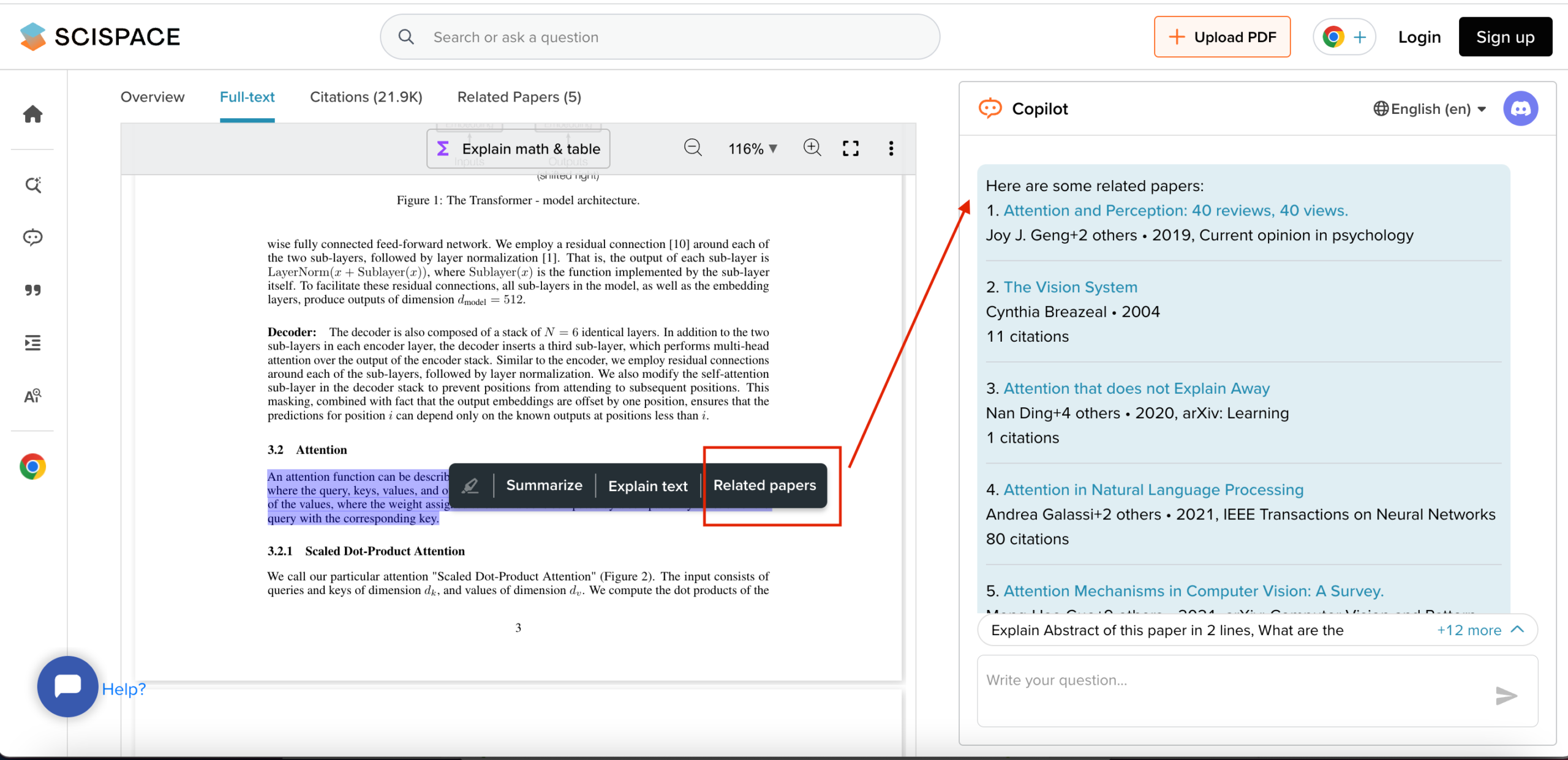
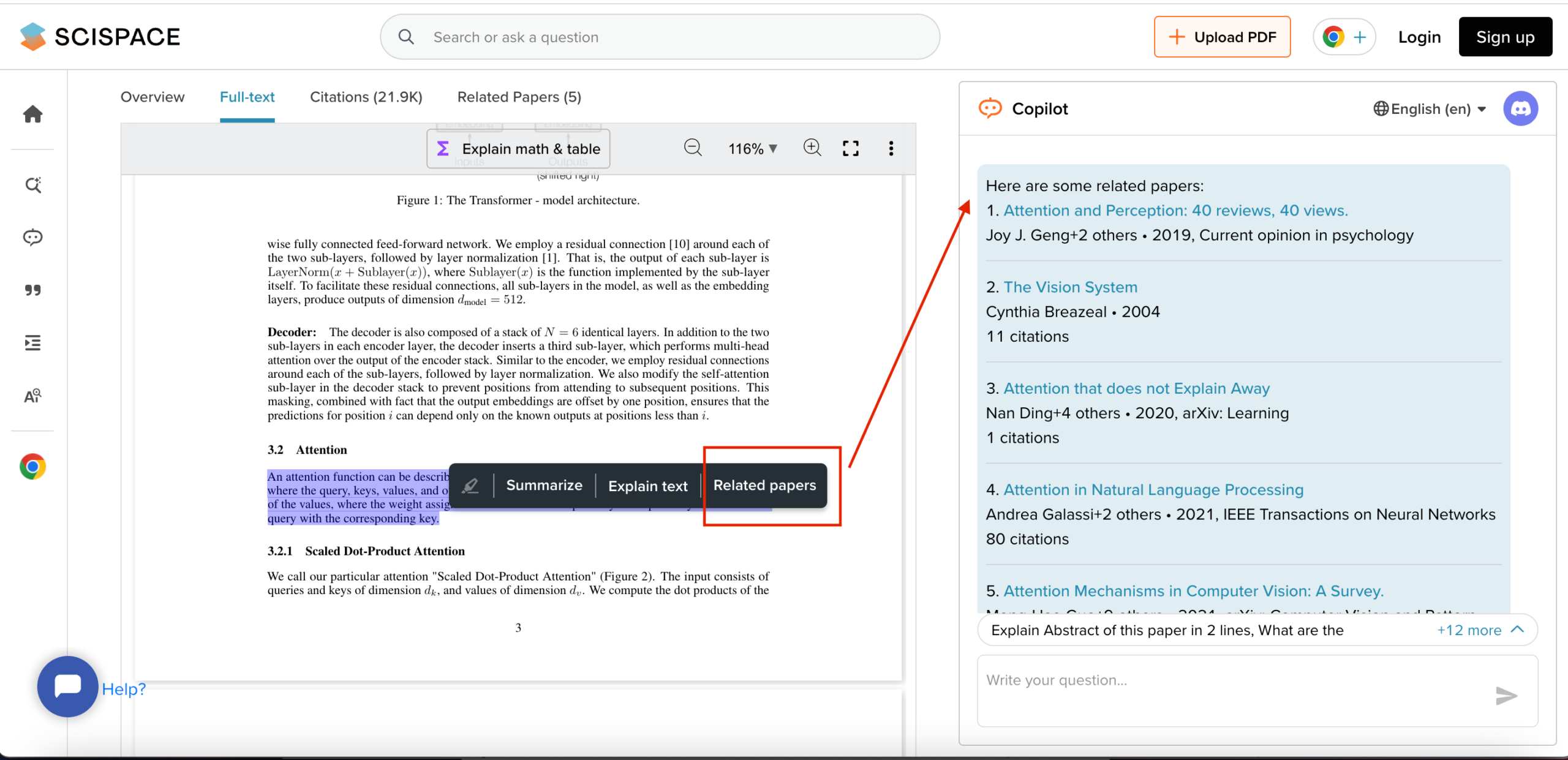
SciSpace related papers panel showing paper recommendations from highlighted text.
SciSpace can suggest related papers from highlighted text, which is useful during early research discovery.

Pros and Cons

Pros

Strong fit for research paper workflows
SciSpace is built around scientific literature, not general AI chat. That makes it more focused for users who regularly work with papers.

Useful combination of discovery, reading, extraction, and writing tools
The platform covers several stages of the research process, from finding papers to understanding and organizing them.

Chat with PDF is practical for dense papers
Being able to ask direct questions about a paper can save time and make difficult material easier to approach.

Extract Data can reduce manual work
For users comparing multiple papers, structured extraction can be much faster than manually copying findings, methods, and citations.

Browser extension adds convenience
The extension makes SciSpace easier to use while browsing papers online.

Free plan available
SciSpace offers a free plan with limited access, which makes it easier to test before paying.

Cons

AI output still needs verification
SciSpace can help summarize, explain, and extract information, but serious work still requires checking the original paper.

Pricing can become expensive for heavier users
The Advanced and Max plans are significantly more expensive than the entry-level Premium plan.

Credits require attention
Because paid plans include monthly credits, users need to understand how credits are consumed and whether unused monthly credits roll over.

Refund window is short
The refund policy gives a 24-hour window under specific conditions. This is important to understand before buying.

Not every user needs a specialized research tool
If you only read papers occasionally, a simpler stack may be enough.

How Much Does SciSpace Cost?

SciSpace offers a free plan with limited access and several paid plans. Pricing may change, so always check the official pricing page before subscribing.

Based on the pricing information reviewed, the visible plans include Premium, Advanced, Max, and Enterprise.

SciSpace offers Premium, Advanced, Max, and Enterprise options, with monthly and annual billing.

Free Plan

SciSpace offers a free plan with limited access.

This is the best place to start if you are not sure whether SciSpace fits your workflow. Before paying, test it with real papers you actually need to understand. Do not test it with random examples. Use your real workflow.

SciSpace Premium

Premium is priced at $20 per month on monthly billing, or $12 per month billed annually.

The plan includes 1,200 monthly credits and is positioned for increased usage and reliable performance. The visible feature list includes unlimited Literature Review search, Pro Model Access, 4 Parallel Agent Queries, unlimited exports in all tools, Biomedical Agent Access, and other unlimited capabilities.

For most individual users, Premium is likely the first paid plan to consider. It is the most realistic upgrade if the free plan feels too limited but you are not doing very heavy research work.

SciSpace Advanced

Advanced is priced at $90 per month on monthly billing, or $70 per month billed annually.

It includes 10,000 monthly credits and is positioned for expert workflows and deeper insights. It includes everything in Premium, Expert Model Access, and 8 Parallel Agent Queries.

Advanced is more appropriate for users who work with research frequently and need significantly more capacity.

SciSpace Max

Max is priced at $200 per month on monthly billing, or $160 per month billed annually.

The visible default option includes 40,000 credits per month. It includes everything in Advanced, Priority Support, 16 Parallel Agent Queries, and priority access to new features.

This plan is likely too much for most individual users unless research is central to their professional work.

SciSpace Enterprise

SciSpace also offers an Enterprise plan. It includes Advanced features plus admin-managed access, shared credit pools, SSO/SCIM, consolidated billing, dedicated support, customizable integrations and limits, account management, premium support, custom agents, usage policies, audit logs, custom roles, API-based integrations, and increased or custom file upload limits.

This is mainly relevant for teams, institutions, or organizations managing research workflows at scale.

SciSpace Alternatives

Elicit

Elicit is probably the most direct alternative to SciSpace for research workflows.

It is built around finding and analyzing academic papers, especially for literature reviews and evidence synthesis. If your main need is structured paper discovery and research question exploration, Elicit is worth comparing closely.

Perplexity

Perplexity is better if your research includes broader web search, current information, and cited answers from online sources.

It is not as specialized around scientific papers as SciSpace, but it can be very useful for exploring topics, finding sources, and getting quick overviews.

Perplexity vs ChatGPT for research

Consensus

Consensus is useful when you want evidence-based answers to scientific questions.

It is especially relevant for users who want to ask a question and see what research says, rather than manually build a broader research workflow.

ChatGPT

ChatGPT is a flexible general-purpose AI assistant. It can help summarize text, organize notes, generate outlines, rewrite explanations, and turn research into written output.

However, ChatGPT is not primarily a scientific literature discovery platform. It can be part of your workflow, but it does not replace a specialized paper-focused tool like SciSpace.

SciSpace vs Elicit

SciSpace and Elicit are both useful for research workflows, but they are not identical.

SciSpace is usually better if you want a broader all-in-one environment for working with papers. It combines literature review, PDF chat, data extraction, writing tools, citations, browser access, and research organization features.

Elicit may be better if your main priority is structured literature discovery and evidence synthesis around a research question.

The better choice depends on your workflow.

Choose SciSpace if you want to read papers, chat with PDFs, extract data, generate citations, and support writing inside one research environment.

Choose Elicit if your main goal is to identify and analyze research papers around a specific question in a more structured review process.

For many knowledge workers, SciSpace may feel more practical as a daily research companion because it supports more stages of the workflow. For users doing more formal literature reviews, Elicit deserves a serious comparison.

User Reviews and Real-World Feedback

User feedback around SciSpace appears generally positive, but not without criticism.

On Trustpilot, SciSpace shows a 4.4 rating from 331 reviews at the time reviewed. Positive feedback often focuses on ease of use, customer support, access to literature, research efficiency, and the ability to find useful information with references.

The criticism is also worth noting. Some users mention concerns around pricing, subscription structure, automatic renewals, unexpected charges, occasional slowness, login issues, and credit or token usage.

This mixed pattern is common with AI subscription tools. A product can be genuinely useful and still create frustration if pricing, renewals, limits, or credits are not clear to the user.

The practical takeaway is simple: do not judge SciSpace only from screenshots or marketing pages. Test it with two or three real papers from your own workflow. Ask the kinds of questions you actually need answered. Check whether the responses are useful, whether the sources are traceable, and whether the credit usage makes sense for your workload.

Support, Refund and Cancellation

SciSpace offers several support options, including Help Center, Support Bot, email support, live chat, and higher-level support for Max and Enterprise users.

Enterprise customers may also get dedicated managed services, account management, premium support, custom integrations, custom limits, and administrative features.

Cancellation and refund terms are important.

SciSpace says users can cancel their subscription at any time through the account page or by contacting customer support. However, the refund policy is limited. A full refund is available only if the user cancels within 24 hours of the initial order and has used less than 300 credits. After 24 hours, the payment is non-refundable and the service continues until the end of the contracted term.

Add-on credits are final and non-refundable.

This does not mean you should avoid SciSpace. It means you should test the free plan first, understand the pricing page, and be careful before choosing annual billing or buying additional credits.

Is SciSpace Worth It?

SciSpace is worth it if research papers are a regular part of your work.

Its value is strongest when you need to move through several stages of research: discovering papers, understanding dense material, extracting useful findings, identifying related studies, generating citations, and turning research into writing or analysis.

For knowledge workers, that can be a real advantage. Many people do not struggle because they lack access to information. They struggle because the process of turning complex information into usable insight is slow and fragmented.

SciSpace helps with that.

It is less worth it if you only occasionally need a paper summary, if your research is mostly web-based, or if you already have a workflow that works well with tools like Perplexity, ChatGPT, Google Scholar, Zotero, and manual reading.

The best approach is to start with the free plan, test SciSpace on real papers, and only upgrade if you can clearly see that it saves time or improves your research workflow.

Final Verdict: Should You Use SciSpace?

SciSpace is not a tool everyone needs, but it solves a real problem for people who regularly work with research papers.

Its main value is not that it magically does research for you. Its value is that it reduces friction across the research process. It can help you find relevant papers, understand difficult sections, ask better questions, extract structured information, manage citations, and move from reading to writing with less manual effort.

For knowledge workers who use research as input for articles, reports, strategy, analysis, or decision-making, SciSpace is worth trying.

The right way to use it is not as a replacement for critical thinking. The right way to use it is as a research assistant that helps you get to the important parts faster, while you remain responsible for checking the source, understanding the context, and deciding what is actually useful.

If research papers are a recurring part of your workflow, SciSpace is one of the more relevant AI research tools to test.

Leave a Comment